Increase number of rows returned from Get Items SharePoint Action under Power Automate
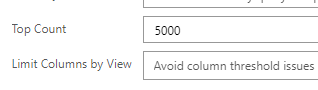
By default, SharePoint Get Items action only returns 100 items which matches your Filter Query. You must always try to use ODATA filter query to reduce the number of rows that are being returned to you. This will make your cloud Flows much for efficient. If you have a large SharePoint List and your use-case requires, getting more than 100 items, then you will need to make a small setting change to the Get Items action in your Flow. You will have to do this change each time you add a Get Items action requiring more than 100 items. 1 - If your requirement is upto 5000 records In this scenario, you can change the Top count property to 5000. 2 - If your requirement is upto 100,000 records Under this scenario, click the 3-dots ellipses next to the Get Items action and turn on the pagination settings with Threshold equal to or less than 100,000 depending on your use-case. Note that your license type may restrict the maximum number your can use in the Threshold settings. All licens...
